
Google Starts Rolling Out Gemini AI Features in Chrome to Users in Canada, India and New Zealand
Key Facts
- What: Google is expanding Gemini-powered features in Chrome, including a sidebar chatbot, image generation, and integrations with Gmail, Maps, Calendar and YouTube.
- Where: Initial rollout now underway for users in Canada, India and New Zealand, following the earlier U.S. launch.
- Languages: Support added for French, Gujarati, Hindi, Spanish and dozens of others, with 50 additional countries planned.
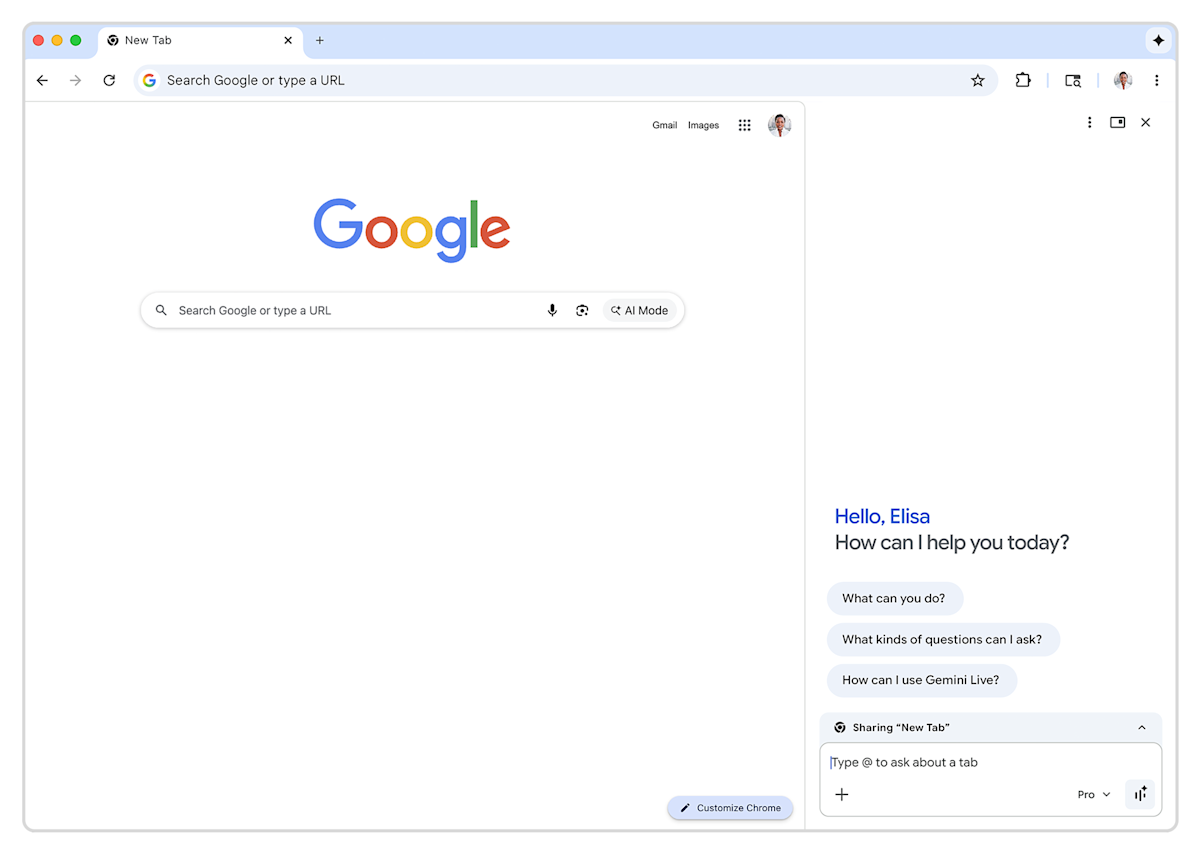
- Access: Users tap the sparkle icon in the top right to open the Gemini sidebar; the feature can be unpinned if unwanted.
- Timeline: Further global expansion and language support scheduled throughout the rest of 2026.
Google has begun rolling out its Gemini AI integration to Chrome users in Canada, India and New Zealand, extending a set of productivity and creative tools that first debuted in the United States earlier this year. The expansion brings the Gemini sidebar directly into the browser, allowing users to chat with the AI assistant, generate images, and interact with other Google services without leaving their current tab.
The rollout, which leverages Google's most advanced Gemini models, marks a significant step in the company's effort to embed generative AI across its consumer products. According to reports citing Chrome release notes, the features are gradually becoming available to users in these three new markets as part of Chrome version 145.
How to Access Gemini in Chrome
To use the new capabilities, users simply tap or click the sparkle icon located at the top right of the Chrome interface. This opens a persistent sidebar that hosts the Gemini chatbot. From there, users can ask questions, request summaries, or generate content while continuing to browse.
The sidebar also provides access to Google's in-house image generation tool, powered by the Gemini Nano model for on-device or lightweight tasks. Early this year, Google introduced several Gemini-powered features to Chrome in the U.S., including the "Nano Banana" image generation capability referenced in product announcements.
Expanded Language Support and Integrations
One of the most notable aspects of this expansion is the addition of new languages. Gemini in Chrome can now converse in French, Gujarati, Hindi and Spanish, among others. This significantly broadens accessibility in multilingual regions such as India and Canada.
The integration goes beyond simple chat. Gemini in Chrome connects with several core Google services, including Gmail, Google Maps, Calendar and YouTube. Users can, for example, ask Gemini to summarize an email thread, check calendar availability, find directions on Maps, or pull information from YouTube videos directly from the sidebar.
Broader Rollout Plans
Google has indicated it will continue expanding Gemini in Chrome to more countries and languages throughout the remainder of 2026. The company has not yet provided an exact timeline for each additional market, but the current rollout to Canada, India and New Zealand represents the first wave of international availability following the U.S. debut.
For users who prefer not to see the AI integration, Google has made it easy to disable. Right-clicking the sparkle icon and selecting "unpin" removes the button from the interface permanently.
Context Within Google's AI Strategy
This Chrome expansion is part of Google's larger push to make Gemini its central AI assistant across products. The company has been rapidly integrating Gemini into Search, Workspace, Android and now the world's most popular web browser. Chrome's massive install base — over 3 billion users worldwide — makes this rollout strategically important for increasing everyday exposure to Gemini.
The features build on Google's January announcement that introduced multiple Gemini tools to Chrome on macOS, Windows and Chromebook Plus devices. Those updates were built on Gemini 3, described by Google as its most intelligent model at the time.
Competitively, the move intensifies Google's rivalry with Microsoft, which has integrated Copilot deeply into Edge, and with emerging AI browsers and extensions. By bringing Gemini directly into Chrome, Google aims to keep users within its ecosystem while offering convenient AI assistance for everyday browsing tasks.
Impact on Users and Developers
For everyday users, Gemini in Chrome promises to reduce context-switching between tabs and applications. Tasks like drafting emails, researching topics, generating images for personal or work use, or quickly checking schedules can now happen in a single browser window.
Developers and power users may find the integrations with Google Workspace services particularly useful for workflow automation. However, as with any new AI rollout, performance and accuracy will likely vary by language and use case, especially in the newly supported regions.
Privacy-conscious users should note that interactions with Gemini typically involve sending data to Google's servers, though the company has emphasized on-device processing for certain lighter tasks via the Nano model.
What's Next
Google's plan to expand to 50 additional countries throughout the rest of 2026 suggests a measured but steady global rollout. Future updates may include deeper web page understanding, more advanced multimodal capabilities, and tighter integration with Chrome's existing tools like tab organization and reading assistance.
Some enterprise-focused updates mentioned in related Google Workspace announcements indicate that Gemini in Chrome is also being prepared for broader business availability, with admin controls expected to roll out in the coming months.
As the AI features mature, Google will likely add more languages and refine the experience based on user feedback from the initial markets.