
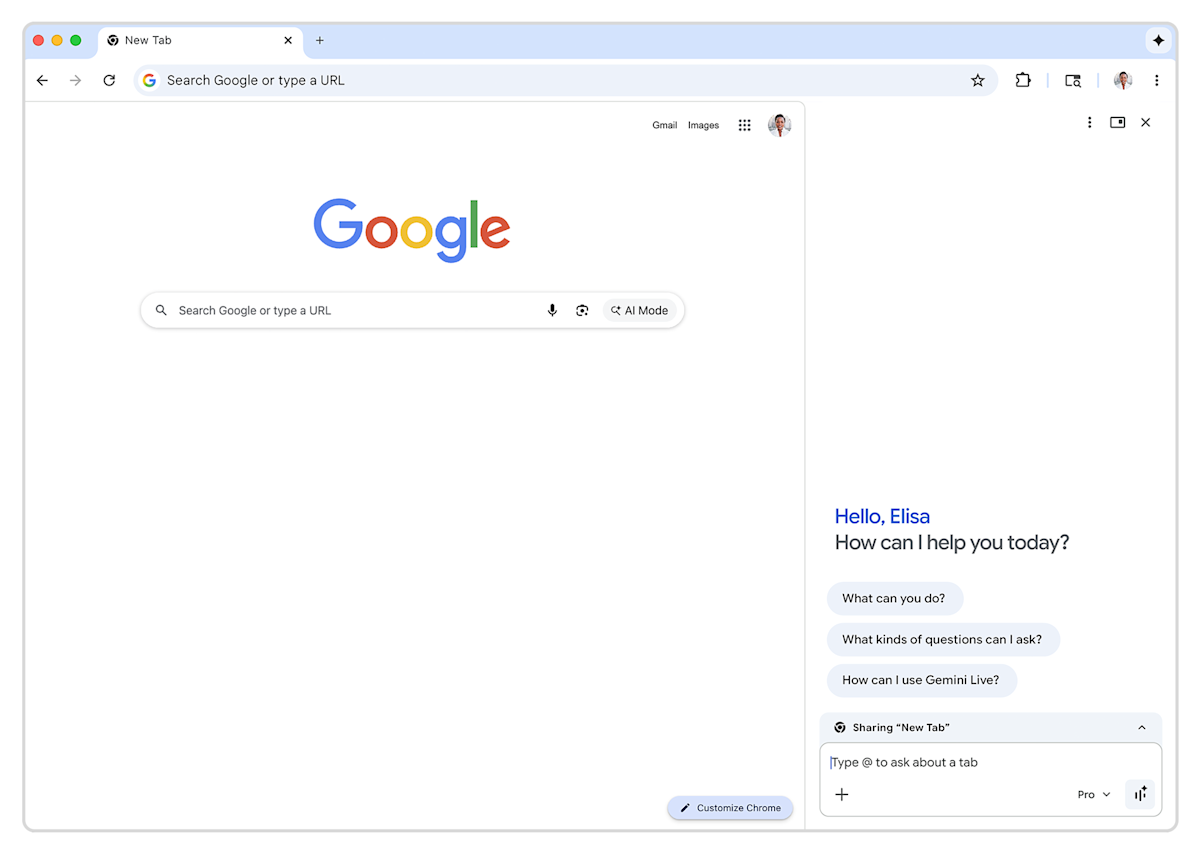
The short version
Gemini in Chrome is Google's AI assistant built right into the Chrome web browser that lets you chat, generate images, and connect with apps like Gmail and Maps without switching tabs. It's now rolling out to users in Canada, India, and New Zealand, supporting 50 new languages including French, Gujarati, Hindi, and Spanish. This means everyday browsing gets a smart helper sidebar—tap a sparkle icon to ask questions, create pictures, or pull info from your Google apps, and it's coming to more countries later.
What happened
Imagine you're browsing the web in Chrome, Google's super-popular browser that most people use daily. Earlier this year, Google added a clever AI sidekick called Gemini directly into it—like having a smart friend pop up in a sidebar to help with stuff on the fly. It started in the United States, but now it's expanding to Canada, India, and New Zealand.
To use it, you just click a sparkle icon (think fairy dust for magic) in the top right corner of Chrome. A sidebar slides open where you can type questions, like "What's the weather?" or "Help me plan a trip." Gemini chats back, generates images (they call one feature "Nano Banana image generation," but it's basically AI making pictures from your words), and links up with your Google stuff—Gmail for emails, Maps for directions, Calendar for schedules, YouTube for videos, and more. No need to open new tabs or apps; it's all right there.
The big win? It now speaks 50 extra languages, so if English isn't your first language, you can chat in French (handy in Canada), Hindi or Gujarati (perfect for India), Spanish, and many others. Google says if you're not in these countries yet, it'll spread to more places and languages through 2026. And if it's not your thing, right-click the icon and "unpin" it to make it vanish forever—no fuss.
This rollout is gradual, starting with Chrome version 145, so not everyone gets it instantly, but it's on the way for eligible users on Mac, Windows, and Chromebook Plus devices.
Why should you care?
For regular folks, this turns your browser into a multitasking powerhouse. Picture this: You're shopping online, and instead of Googling "best running shoes for wide feet," you ask Gemini in the sidebar—it pulls reviews, checks your Calendar for a sale date, and even generates a custom image of the shoe in your favorite color. No tab-juggling chaos.
It saves time and brainpower. If you're in Canada juggling French and English, or in India switching between Hindi and English for work or school, this makes AI feel personal and local. Everyday tasks like emailing a recipe from a YouTube video or mapping a route while checking your schedule become seamless. Plus, it's free (as part of Chrome), so no extra costs—your browsing just levels up without you lifting a finger.
On the flip side, some worry about privacy since it's tied to your Google account and apps, but you control it easily. Overall, it's Google making the web feel smarter and less frustrating, especially if you're tired of app-switching on your phone or laptop.
What changes for you
If you're in Canada, India, or New Zealand and use Chrome (update to the latest version if you haven't), check for that sparkle icon soon—it's rolling out gradually. Once it's there:
- Chat anytime: Ask "Summarize this webpage" while reading news, or "Find cheap flights to Toronto" (Canada peeps) with Maps integration.
- Image magic: Type "A banana boat on a sunny beach" and poof—custom pics appear, great for social media or fun.
- App smarts: Tell it "Schedule a meeting with my team next week" and it checks Calendar and emails invites via Gmail.
- Multilingual ease: Non-English speakers get native responses, making it useful for students, immigrants, or bilingual families.
- Opt-out simple: Don't like it? Right-click and hide it; your browsing stays the same.
Outside these countries? Sit tight—Google promises more rollouts in 2026. No app downloads needed; it's baked into Chrome you already have. Battery drain or speed? Early US users report it's smooth, like adding a helpful passenger to your browser car without slowing the drive.
This matters personally because browsing is how we live—work, shop, learn, connect. Gemini makes it 10% faster and way more fun, reducing "tab overload" that frustrates everyone.
Frequently Asked Questions
### How do I get Gemini in Chrome?
If you're in Canada, India, or New Zealand, update Chrome to the latest version (like 145) on your Mac, Windows PC, or Chromebook Plus. Look for a sparkle icon in the top right—tap it to open the sidebar and start chatting. It's rolling out gradually, so it might take a few days or weeks.
### Is Gemini in Chrome free?
Yes, completely free as part of Chrome—no subscriptions or add-ons needed. It works with your existing Google account and pulls from your apps like Gmail or Maps, but you can unpin it anytime if you don't want it.
### What languages does it support now?
In these countries, it handles 50 new languages on top of English, including French (Canada), Hindi and Gujarati (India), Spanish, and more. You can chat naturally in your preferred language for questions, images, or app tasks.
### Does it work on my phone or just computers?
Right now, it's for desktop Chrome on Mac, Windows, and Chromebook Plus—not mobile yet based on this rollout. Use the Gemini app on your phone for similar features in the meantime.
### Is my data safe with Gemini in Chrome?
It integrates with your Google services, so it knows your emails or calendar to help accurately. Google handles privacy like other features (you can review settings), and you can disable it easily—no permanent changes to your setup.
### When will it come to my country?
Google says more countries and languages throughout 2026, but no exact dates yet. US users got it first; watch Chrome updates or Google's blog for your region's news.
The bottom line
Gemini in Chrome is Google's way of supercharging your daily browsing with an always-ready AI buddy in the sidebar—chatting, imaging, and linking apps without the hassle. For folks in Canada, India, and New Zealand, it means quicker homework, smoother workdays, and fun multilingual tricks starting now, with global expansion ahead. Try it if you're curious (it's easy to remove), because this could make Chrome feel like your personal assistant, saving you time on the web stuff we all do every day. Update your browser and sparkle up your life.
Sources
(Word count: 842)