
The short version
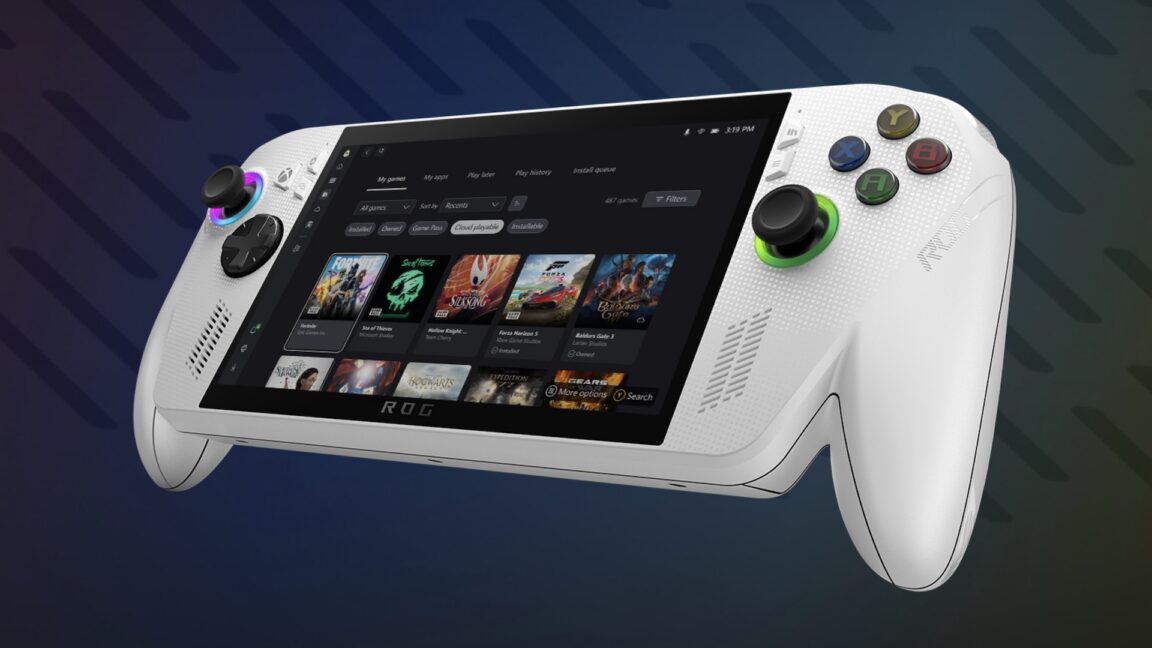
Xbox Mode is a new full-screen gaming interface coming to all Windows 11 PCs from Microsoft, designed like the simple controller-friendly menus on Xbox consoles and handheld devices such as the Steam Deck. It will start rolling out in April 2026 to laptops, desktops, tablets, and gaming handhelds, making it easier to jump into games without fumbling with a mouse and keyboard. For everyday gamers, this means a smoother, console-like experience right on your PC—no extra downloads needed.
What happened
Imagine you're used to playing games on your Xbox, where everything is big, bold, and controlled with a gamepad. You pick your game from a simple grid, hit start, and you're playing. Now picture trying to do the same on your Windows PC—it's often a hassle because Windows is built for office work, with tiny menus, desktop icons, and a mouse that's not great for quick gaming sessions.
Microsoft is fixing that with "Xbox Mode," a streamlined gaming dashboard that's arriving as a built-in feature in Windows 11. Announced ahead of a big gaming conference called GDC 2026, it's inspired by the Steam Deck (that popular handheld gaming PC) and Xbox consoles. Right now, running Windows on portable gaming devices can feel clunky—like trying to use a full office computer setup while lounging on the couch. Xbox Mode swaps that out for a full-screen, controller-optimized view that's easy to navigate, even from across the room. It begins rolling out in April 2026 to all Windows 11 PCs, not just handhelds—think your gaming laptop, desktop tower, or even a tablet.
This isn't some add-on app; it's native to Windows, meaning it'll show up automatically through a regular Windows update. It supports not just Xbox controllers but also fancy gear like racing wheels and flight sticks, as long as they already work with Windows.
Why should you care?
If you game on a PC at all—even casually—this changes how easy and fun it gets. No more squinting at small desktop icons or alt-tabbing between apps while your controller sits unused. It's like Microsoft is turning your PC into an Xbox when you want to play, which matters if you own both or switch between them. For families sharing a PC, kids (or you) can quickly launch games without messing up dad’s work files. And with gaming handhelds booming—like devices you can take on trips—this makes Windows feel less like a curse and more like a superpower for portable play.
Bigger picture: Microsoft is blurring the lines between PC and console gaming. Your game library on PC (via Xbox app or Steam) becomes as couch-friendly as a living room console. Saves you time, reduces frustration, and might even make you play more without needing new hardware.
What changes for you
Practically speaking, here's the day-to-day shift:
- Easier controller use: Plug in your Xbox controller (or other supported gear), switch to Xbox Mode, and browse games like on a console. No mouse required—perfect for TV-connected PCs or handhelds.
- Quick access on any PC: Whether you're on a beefy desktop for high-end games, a laptop for travel, or a handheld like an upcoming Steam Deck rival, it's all the same simple interface starting April 2026.
- No extra setup: It rolls out via Windows Update, so if your PC is on Windows 11, it'll appear without you hunting for downloads. Works with your existing games and peripherals.
- Better for shared or casual use: Great for living room setups—project your PC to a TV, grab a controller, and game without the full Windows desktop clutter.
- Potential performance perks: Early tests hint at features like "advanced shader delivery," which is tech-speak for smoother graphics loading, but the real win is the interface making everything feel faster to start.
If you're not a gamer, it won't clutter your PC—it's opt-in for gaming sessions. Upgrading to Windows 11? This is one more reason it's worth it for fun over clunky alternatives.
Frequently Asked Questions
### When exactly can I get Xbox Mode on my PC?
Microsoft starts rolling it out in April 2026 as a native Windows 11 update. It won't hit every PC on day one—expect a gradual rollout over weeks or months, depending on your device and region. Keep Windows Update running to grab it as soon as it's available for you.
### Do I need special hardware, like a gaming handheld?
Nope—it's for all Windows 11 PCs, including regular laptops, desktops, tablets, and handhelds. It shines with controllers, racing wheels, or flight sticks, but works with keyboard/mouse too. As long as your PC runs Windows 11, you're good.
### Is Xbox Mode free, and does it replace the regular Xbox app?
Yes, it's completely free as a built-in Windows 11 feature—no subscription or purchase needed. It builds on the existing Xbox app for your game library but adds a full-screen, console-style overlay. You can still use the old desktop view if you prefer.
### How is this different from the Steam Deck or regular Xbox?
Unlike the Steam Deck's custom "Big Picture Mode" (Steam-only), Xbox Mode is baked into Windows for any games, not just Steam's. It's more like an Xbox console dashboard but on PC hardware—simpler than Windows desktop gaming, with broader peripheral support. No need for a separate device.
### Will this make my games run better or change my settings?
The interface is the big change—faster to launch and navigate. There are hints of performance tweaks like better graphics handling, but it won't overhaul your game settings. It's about convenience, not magically boosting frame rates.
The bottom line
Xbox Mode is Microsoft's smart move to make PC gaming as effortless as popping in an Xbox disc, hitting every Windows 11 user starting April 2026. If you game on PC—even occasionally—this free update means less hassle, more playtime, and a unified feel across your devices. No more "Windows on handhelds is a curse"—it's now a breeze. Update your PC, grab a controller, and enjoy the console life without buying new gear. Gamers win big here.
Sources
- Ars Technica: Windows 11's Steam Deck-ish, streamlined Xbox gaming UI comes to all PCs in April
- Windows Latest: Tested: First look at the new Xbox Mode for Windows 11 PCs
- Windows News: Windows 11 Xbox Mode Arrives in April
- Windows News: Xbox Mode Coming to Windows 11 in April 2026
- Windows News: Windows 11 Xbox Mode Launches in April